
To find an FDA drug label, distinguish the latest FDA-approved labeling in Drugs@FDA from the in-use labeling published in DailyMed and searchable through openFDA. Match the product, formulation, and record version, then connect the label to its regulatory application and relevant trial records rather than treating those sources as interchangeable. AnswerThis’s drug label search helps inspect DailyMed and openFDA records, while its separate application and trial tools help locate supporting evidence that should be cited from the original regulator or registry.
TL;DR
Use Drugs@FDA to verify FDA-approved labeling for products it covers.
DailyMed provides current in-use labeling, while openFDA makes FDA SPL label data searchable. Both can differ from the latest FDA-approved labeling.
AnswerThis provides separate searches, with EMA portal links rather than integrated EMA results.
Keep product identity, jurisdiction, source version, and retrieval date with every claim.
DailyMed vs Drugs@FDA vs openFDA
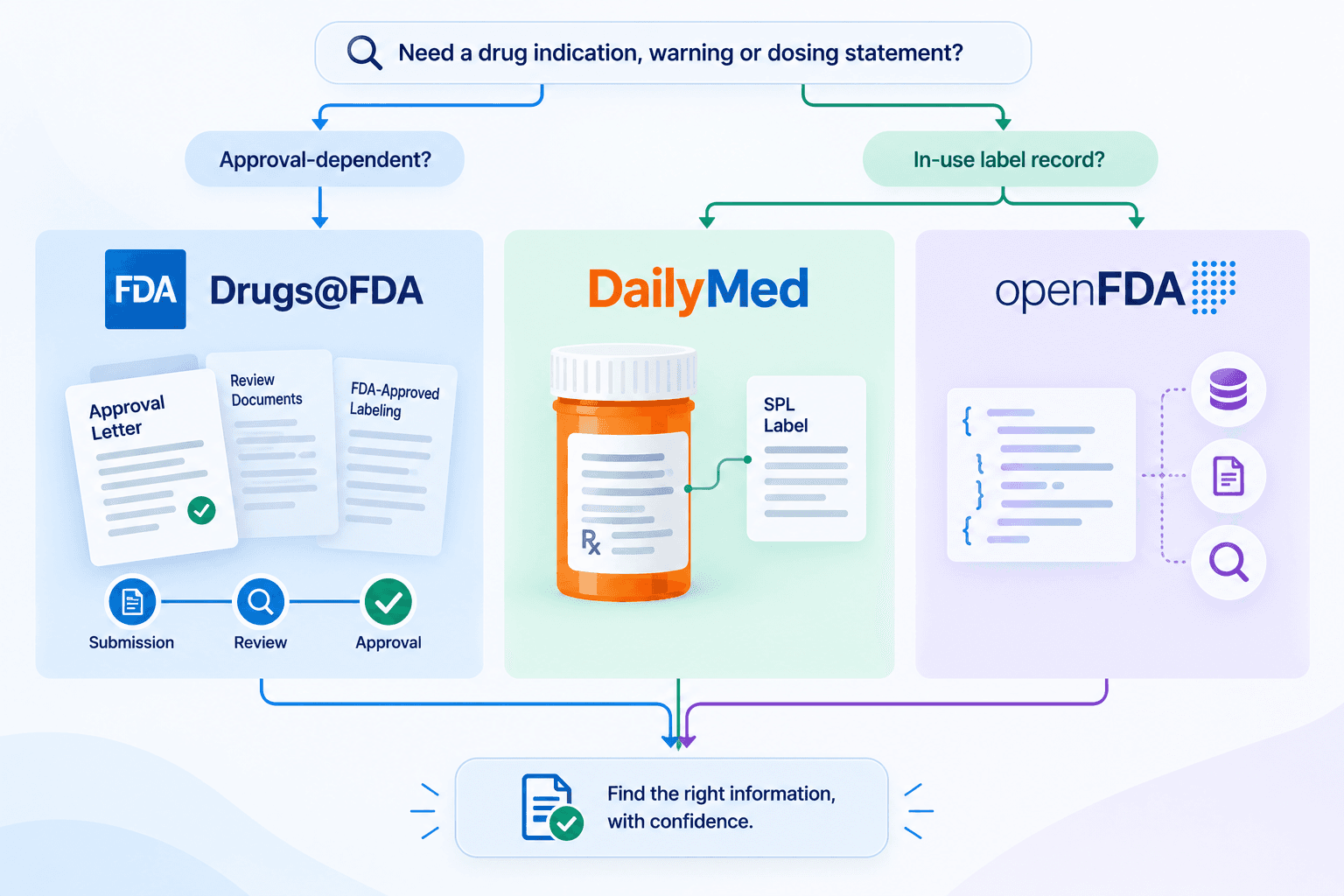
Use Drugs@FDA for approval-dependent claims and DailyMed or openFDA to locate in-use label records. The distinction matters when checking an indication, warning, or dosing statement: the most recently submitted label is not necessarily the latest FDA-approved label.
Drugs@FDA
What it contains: Application histories, available approval documents and FDA-approved labeling for products it covers
What to verify before citing: Application number, product identity, document type and date
DailyMed
What it contains: In-use labeling submitted by companies as Structured Product Labeling (SPL)
What to verify before citing: Labeler, formulation, SET ID, version, and source date
OpenFDA drug label
What it contains: Searchable SPL label data
What to verify before citing: Exact record identity and full-label context, not just a returned field
OpenFDA Drugs@FDA
What it contains: Drug-application and product metadata
What to verify before citing: Application and submission details, followed by the official supporting documents
DailyMed’s official explanation states that in-use labeling can differ from FDA-approved labeling and that NLM does not review SPL content before publication. Its collection includes some products that are not FDA-approved. Finding a DailyMed record is therefore not proof of approval.
Select the product before selecting the passage
Same-ingredient products can differ in formulation, strength, route, labeler, and application. Preserve the SPL SET ID and version for an exact label record. When tables, images, or wording matter, read the full label rather than relying on an extracted API field.
A missing field does not prove the full document lacks that information. Check the source record, and do not combine a warning from one version with an indication from another.
FDA and EMA regulatory-source differences
FDA application records concern the US regulatory pathway. EMA medicine pages and European public assessment reports (EPARs) concern centrally authorised medicines in the European Union. An EMA assessment does not establish US approval, and product information from one jurisdiction should not be presented as the label for another.
FDA’s labeling resources explain where to find approved and current labeling. Drugs@FDA does not cover products regulated by FDA’s Center for Biologics Evaluation and Research. Use the relevant FDA biologics resources when your product falls outside its coverage.
Follow metadata to the original documents
openFDA Drugs@FDA returns application and product metadata, not a full-text search of every approval document. Follow the official application history to inspect the available approval correspondence, reviews, and labeling. FDA guidance documents explain agency thinking and are not approval evidence for a particular product.
EMA portal links lead to the agency’s own search environment. Confirm medicine identity, indication, authorisation holder, and document version there. AnswerThis’s FDA application lookup uses openFDA Drugs@FDA, while its EMA controls are labelled portal links rather than integrated EMA results.
From product name to label, approval documents and trials
Use the following five-step workflow to connect label and regulatory records to trial evidence without losing their separate identities. Start with public, non-confidential terms and keep a search log alongside the documents.
1. Define the product and question
Record the product or ingredient, formulation, jurisdiction, and question you need to answer. Decide whether the required source is an application document, label, trial record, or assessment. A product name alone is not a unique identifier.
2. Locate the regulatory application
Search the product, ingredient, or prefixed NDA or ANDA identifier using the FDA application search and EMA links page. Match the returned application and product details, then open the official Drugs@FDA history. Use the EMA portal separately for the EU medicine record and EPAR.
3. Select the exact label
Search DailyMed or openFDA and match the product, labeler, dosage form, and available strength. Preserve the SET ID, version, and source date, then read the full official label for the wording you intend to cite. Do not combine sections from different label records.
4. Check the trial record
Search ClinicalTrials.gov and confirm the NCT identifier, sponsor, population, and study status. Save the record’s last-update date and official link. A registry entry is not proof that a treatment works, that results are available, or that a person is eligible to enrol.
5. Build the evidence row
For each claim, record the exact statement, source agency, jurisdiction, document identifier, version or source date, retrieval date, and supporting section. Link the original document and state any limitation on what it establishes. Keep missing information visible instead of interpreting an absent field as a negative finding.
The FDA application search and EMA links tool assists with locating the application and opening the relevant official sources. It does not combine all label, EMA, and registry searches into one result set.
Example: distinguish same-ingredient records
A metformin search illustrates record matching, not a clinical conclusion. Compare formulations and applications before selecting the label, then examine relevant trials separately. Record differences in population, indication, and dates rather than treating every same-ingredient record as equivalent.

ClinicalTrials.gov and trial records
A clinical trial assigns people to one or more interventions to evaluate effects on health outcomes. ClinicalTrials.gov records study information, including sponsor-entered status and available results information. A registration is not the same as a clinical study report or evidence of a successful outcome.
Check the NCT identifier, sponsor, population, intervention, status, and last-update date. Confirm that any results you cite belong to the selected record and are actually available. Recruitment status, eligibility, and the existence of published findings are separate questions.
Interpret phases without assuming enrollment status
FDA’s clinical research overview gives the following general drug-development ranges. They are not fixed requirements for every programme.
Phase 1
Participants in FDA’s overview: 20 to 100
Typical duration: Several months
Purpose: Safety and dosage
Phase 2
Participants in FDA’s overview: Up to several hundred
Typical duration: Several months to 2 years
Purpose: Efficacy and side effects
Phase 3
Participants in FDA’s overview: 300 to 3,000
Typical duration: 1 to 4 years
Purpose: Efficacy and adverse-reaction monitoring
Phase 4
Participants in FDA’s overview: Several thousand
Typical duration: After approval
Purpose: Post-market safety and efficacy
Not every study has a drug-development phase. Document your use of phase filters, and check current recruitment information in the source record rather than inferring it from phase alone.
AnswerThis’s trial search covers ClinicalTrials.gov. A broader registry review needs a documented source strategy and each registry’s own identifiers, not an assumption that one tool searches all international registries.
How to trace every claim to a source
Cite the original document that establishes the claim, not merely the search page that helped you find it. Keep record identity, jurisdiction, and version together so another reviewer can reproduce your check.
FDA-approved indication
Evidence to retain: Relevant FDA-approved labeling, application, and document date
Mistake to avoid: Treating any in-use label as approval evidence
Exact label wording
Evidence to retain: Full label, SET ID or application identifier, version and section
Mistake to avoid: Mixing passages from different products or versions
Regulatory history
Evidence to retain: Application identifier, submission event and associated document
Mistake to avoid: Calling every submission date an approval
Trial status or results
Evidence to retain: NCT identifier, source fields, update date and results section where available
Mistake to avoid: Treating registration as evidence of effectiveness
Distinguish the source-document date, data-feed update date, and your retrieval date. They describe different events. If a field is missing, inspect the fuller official record before interpreting the absence.
For an evidence row, use: claim | product or study | agency and jurisdiction | identifier | version/source date | retrieval date | supporting section | official link | limitation. This is a recording template, not a completed research finding. Keep the verified quotation separate from your interpretation. AnswerThis AI systematic reviews for life sciences provides a related literature-review workflow for organising research evidence alongside those official records.
Other clinical and regulatory workflows
Use these tools after locating the evidence, when the task calls for a working document or a different decision source. The AnswerThis clinical research templates and tools hub provides the relevant IRB, 510(k), CSR/SAP/DMP and pharmacovigilance pages.
IRB protocol and consent
Practical use and boundary: Prepare separate working outlines, then apply the local IRB’s form and review requirements. A draft is not ethics approval.
510(k) summary
Practical use and boundary: Organise device safety and effectiveness information with regulatory anchors. The outline does not establish substantial equivalence.
CSR, SAP and DMP
Practical use and boundary: Prepare distinct clinical-study report, analysis-plan and data-management structures. ICH E3-style organisation does not supply study evidence or regulatory approval.
Pharmacovigilance
Practical use and boundary: Start DSUR, PBRER/PSUR or EU RMP outlines, then verify the period, jurisdiction and reviewed safety evidence. The template does not make a benefit-risk finding.
HTA and coverage
Practical use and boundary: Locate assessment or payment-policy records for the issuing jurisdiction. Authorisation, assessment and coverage remain separate decisions.
The HTA and coverage lookup provides CMS catalogue searches, configured agency-site search and labelled portal links. Read the applicable policy and dates before interpreting a result as current coverage.
Clinical guideline discovery and de-identified adverse-event narrative drafting are related tasks, not substitutes for label verification. Use only appropriate public or de-identified inputs, and check each tool’s stated free-to-try allowance. Preserve results before leaving because signup does not automatically transfer anonymous work.
FAQs
What is the difference between DailyMed and Drugs@FDA?
DailyMed publishes in-use labeling submitted by companies, while Drugs@FDA provides FDA-approved labeling for products it covers. The versions can differ, so a DailyMed record alone does not establish the latest FDA-approved wording.
How do I find the latest FDA-approved drug label?
Find the exact product and application in Drugs@FDA and inspect its latest relevant approved labeling. Match formulation and document date. For products regulated by FDA’s Center for Biologics Evaluation and Research, use the relevant FDA biologics resources instead.
What is a clinical trial?
A clinical trial is a research study in which people are assigned to one or more interventions, such as a drug, device, or behavioural programme, to evaluate effects on health outcomes. A registry entry describes the study but does not by itself establish effectiveness or enrollment eligibility.
What are the phases of a clinical trial?
Drug trials generally use four phases: Phase 1 assesses safety and dosage, Phase 2 studies efficacy and side effects, Phase 3 evaluates efficacy and adverse reactions, and Phase 4 studies the product after approval. Not every study type has a drug-development phase, and the FDA’s participant and duration ranges are general descriptions.
How does AnswerThis help search drug labels and trial data?
AnswerThis provides DailyMed and openFDA label search, separate FDA application lookup, and ClinicalTrials.gov search, with EMA portal links. Preserve the returned identifiers and dates to organise your evidence, then cite and verify the original regulator or registry documents rather than the generated summary.
To investigate the research behind a label or trial record, Explore AnswerThis. Preserve your public-tool results first and check the supporting papers and official documents before using a claim.