Steps to Draft a Research Proposal Using AnswerThis
Steps to Draft a Research Proposal Using AnswerThis
This tutorial shows you how to draft a research proposal using Draft a research proposal in AnswerThis. Follow the steps in order. Each step tells you where to click, what you will see and what to check before you move on.
Use it when you have a study idea and need a cited first draft of the background, aims and methods. AnswerThis searches the literature, writes the proposal and gives you an editable Word file.
The tutorial follows one example from start to finish. Every figure comes from the same run.
Step 1. Sign in and choose the skill
Sign in at answerthis.io. Below the question box, select + More skills, then Write. Scroll the list and select Draft a research proposal, described as "Aims, background and methods".

Figure 1. The end of the Write group.
A Research proposal tag appears inside the question box, which now reads "Describe your research proposal's aims, background and methods...". To leave the skill, select the × on the tag.

Figure 2. Draft a research proposal is selected.
Step 2. Describe your study
Say what the study will test, in whom and where. Then list the sections you want, and give a length.
The example describes a school-based study:
Draft a two-page research proposal for a school-based study testing whether a 1-hour screen curfew before bedtime improves sleep duration and sleep quality in students aged 13 to 16. Include the background, aims, research questions, methods (design, sample, measures, analysis), expected outcomes and limitations.
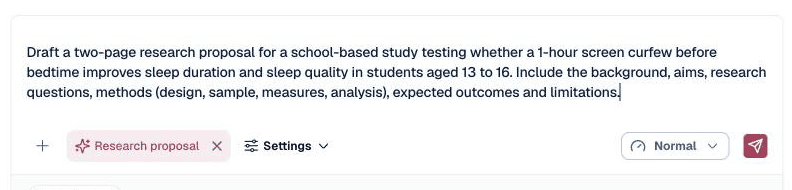
Figure 3. The example request in the box.
To use a funding call's template or criteria, select + and add the call as a file before you send.
Step 3. Send the request
Leave the menu beside the send arrow on Normal. Then select the red send arrow. The canvas opens. AnswerThis searches for papers, lists them in the Sources tab, then writes the proposal.
Step 4. Read the proposal
When it finishes, the left side gives a short note and two file cards: a Word file and an editable draft. The draft opens in the File tab on the right, with a title, its length and its number of sources.

Figure 4. The note and file cards on the left. The proposal opens in the File tab on the right.
In the example, the proposal is titled One Hour Offline: A School-Based Trial of a Pre-Bedtime Screen Curfew in Adolescents. It has 714 words and cites 3 sources. It follows the requested structure:
Background and rationale
Aims and research questions, with two aims and the research questions
Methods: design and setting, intervention and comparator, measures, analysis and planning sample
Expected outcomes, significance and limitations
It ends with Open inputs, a list of things you must confirm, such as recruitment capacity, ethics procedures and the final sample size.
Figure 5 shows the complete proposal, from top to bottom.


Figure 5. The complete draft proposal with its IEEE reference list.
Step 5. Check the proposal
Check the design choices, not only the writing. In the example, confirm the sample size, the measures and the analysis with a statistician or supervisor. The proposal itself says its planning sample is not a final power calculation.
Then check each citation in the Citation Lists box under the draft. The note on the left says which papers were cited from abstracts only.
Step 6. Edit and adapt
Click into the draft to edit it, or select Open in AI Writer for the full editor. The toolbar works as in the other writing skills.
To adapt the proposal, use the follow-ups above the message box. In the example, AnswerThis suggests Adapt the proposal to a specific funding call and its review criteria. The tutorial on Convert or export continues from this proposal.
Step 7. Download the proposal
Select the Word file card on the left to open it, or use Download document in the toolbar to choose a format.
Step 8. Do a final check
Before you use the result, confirm that:
The aims, questions and methods fit together.
The sample size and analysis are checked by someone qualified.
Each citation supports its claim.
Everything listed under Open inputs is confirmed.
The final proposal is in your own words and meets the funder's rules.
Summary
Draft a research proposal gives you a cited first draft with a background, aims, methods and limitations, plus a Word file. Describe the study and the sections you need, then check the design, the citations and the open inputs before you submit.
